Improving operations workflow in the back-office


Exploration to make Workflow Management structured & seamless
Back-Office DashboardNavigation designUI componentsWeb (Desktop)
Team
Tooling Squad
4 Devs + 1 PM + 1 Designer
Role
Designer (Solo)Status
LiveShipped in
2025Overview
Upvest is an investment API infrastructure used by big FinTech names like Revolut, N26, SumUp, Shares, Bunq, Ginmon, Liqid, and the list only keeps growing.
The Back-Office of Upvest is an all-encompassing dashboard used by the Operations team (Ops) to process investment entities flowing into Upvest. Ops' day-to-day duties ranged from reconciliations to user KYC, to, checks & approvals for Corporate Actions.
The Workflow Management module contains all of the Ops agent's assignments in one page, in one overloaded table, without clear actions. It's an old implementation and looks broken because it was created without references from a designer.
Workflow Management 2.0 aka Case Manager was an initiative driven by the product team. And as the sole designer in the company, I initiated the foundational work for the Case Manager.
Situation
Workflow Management is the module that contains work "assignments" from other modules. For instance, a Corporate Action (CA) Processing entity can be assigned to an Ops member inside the CA module (on the left in the image below) and the Ops agent can see this "assigned" to them on their Workflow Management module.

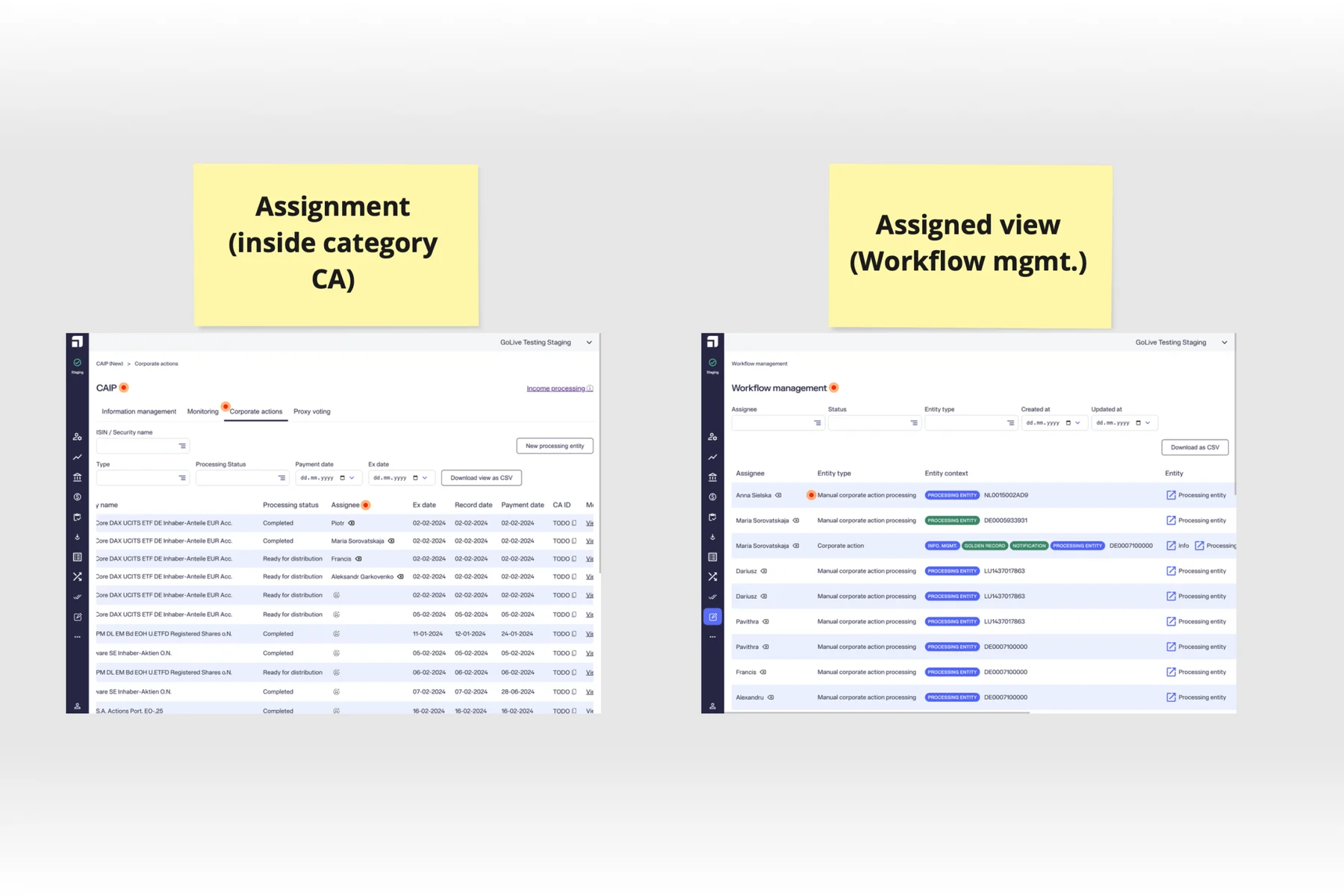
The Workflow Management (WM) module is one page (on the right) with one overwhelming table, that contains assignments of all operators, from all modules.
Assignments and Comments are functionalities that should be available to all the modules on the back-office, and are being slowly rolled out based on whichever team needs it first. And these "universal functionalities" are owned by my team - Tooling. We work on improving the back-office, in launching new functionalities and making changes to existing ones.
Hurdles
While the Tooling team owned the Assignments & the Comments features as part of Workflow Management (WM), embedding the feature on the respective modules was backend controlled by the respective teams. So the Assignment data on the Users module was owned by the User Management team, and on the Corporate Action module was owned by the CA team. These stakeholder teams had to send us the assignments and comments data to be shown on Workflow Management module.
At the time, due to the Tooling team's dependency on other teams that were prioritizing more important topics like Introducing Business Users, the Case Manager was a de-prioritised from implementation and stayed on as a concept.
Product Exploration
Initial Questions
These were a few initial questions I wanted answered for myself:
- What are the improvements that the Workflow Management needs? How to prioritize them?
- Where will the new Case Manager be positioned? Will the upgrade be felt by the ops user?
- Does it scale well with the modules that don't have assignments yet?
- How to make it plug-n-play for easy implementation?
- How to tackle the data flow from different modules? And how to show different filters for each module?
Suggested Improvements
Improvement 1: Structural
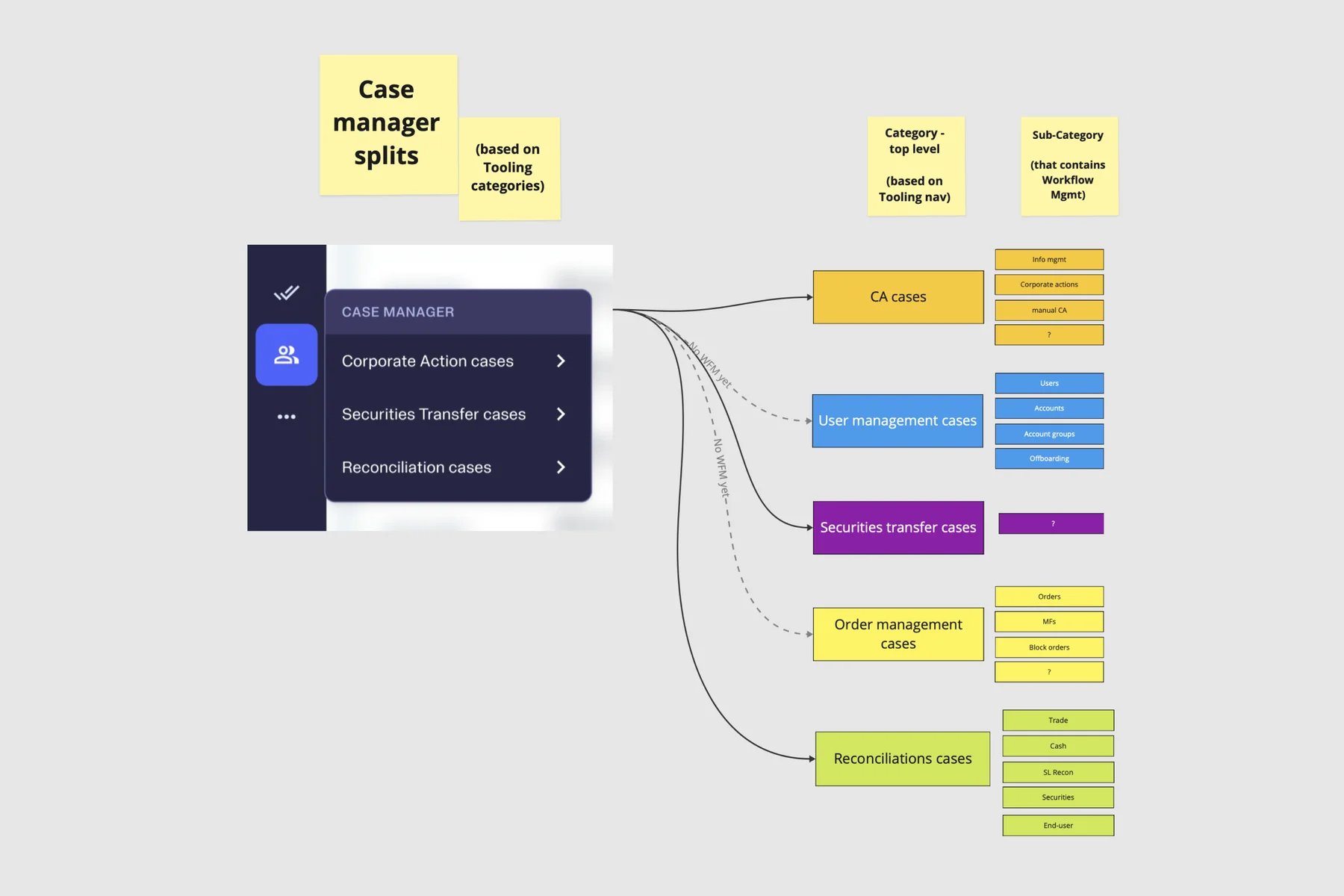
Grouping assignments into separate pages, based on it's modules, for better hierarchy and structure in the Case Manager. Separate pages meant having a dedicated space for managing cases assigned to a particular Ops team.

Improvement 2: Functional
I planned on fuelling the sub-tabs with different data, because standardizing the tables could be a pain-stackingly needless undertaking, if we can enable different tables for different modules.
So introducing it to a new module could be as easy as
- Deciding the table data columns & filters with the (Eg. Corporate Actions) Ops agent
- Communicating it to the team that owns the module (Eg. Corporate Actions)
- Receiving the data structure from the team (Eg. Corporate Actions)
- Adding a new sub-tab to the Case Manager
Design Exploration
Creating Sub-Modules
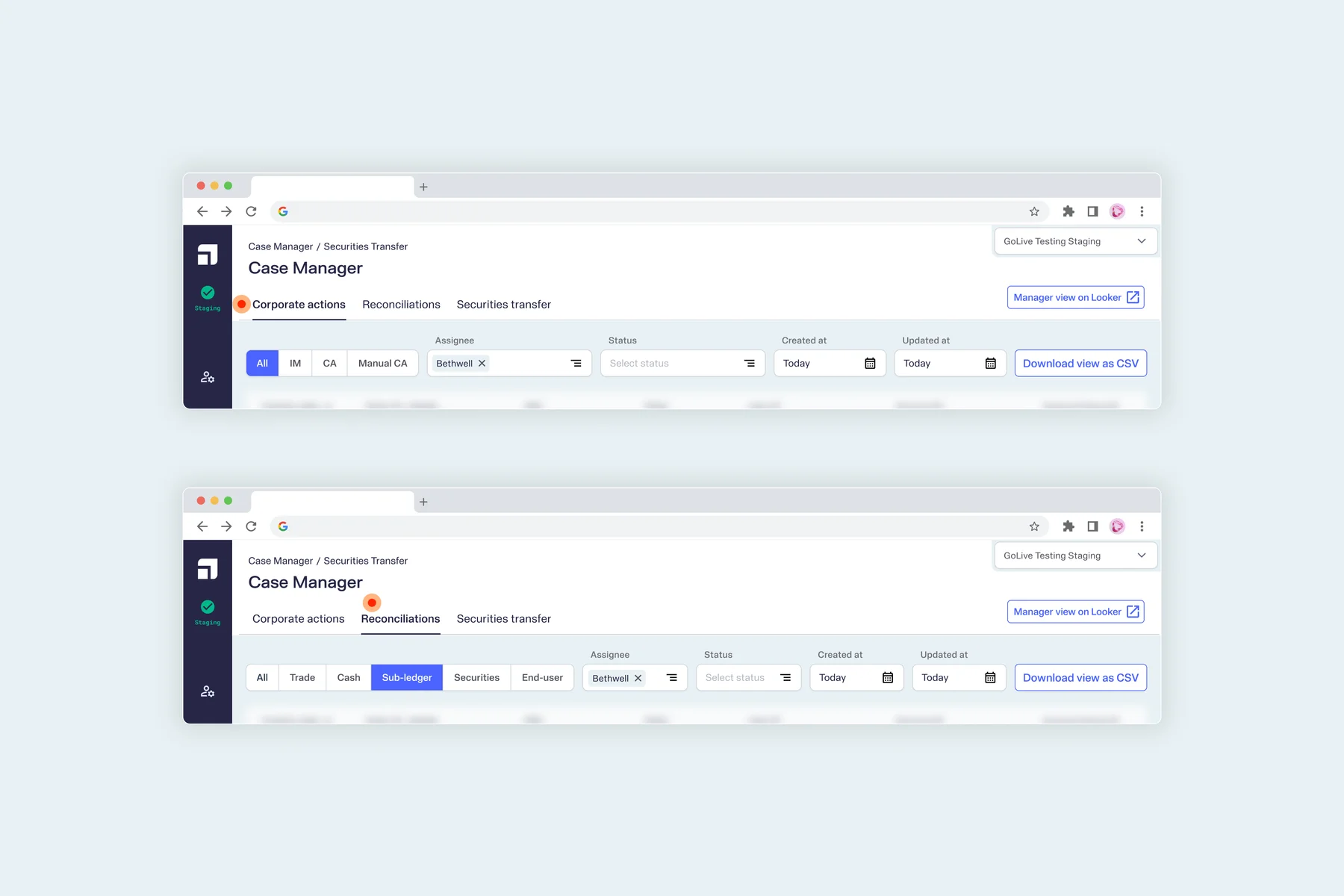
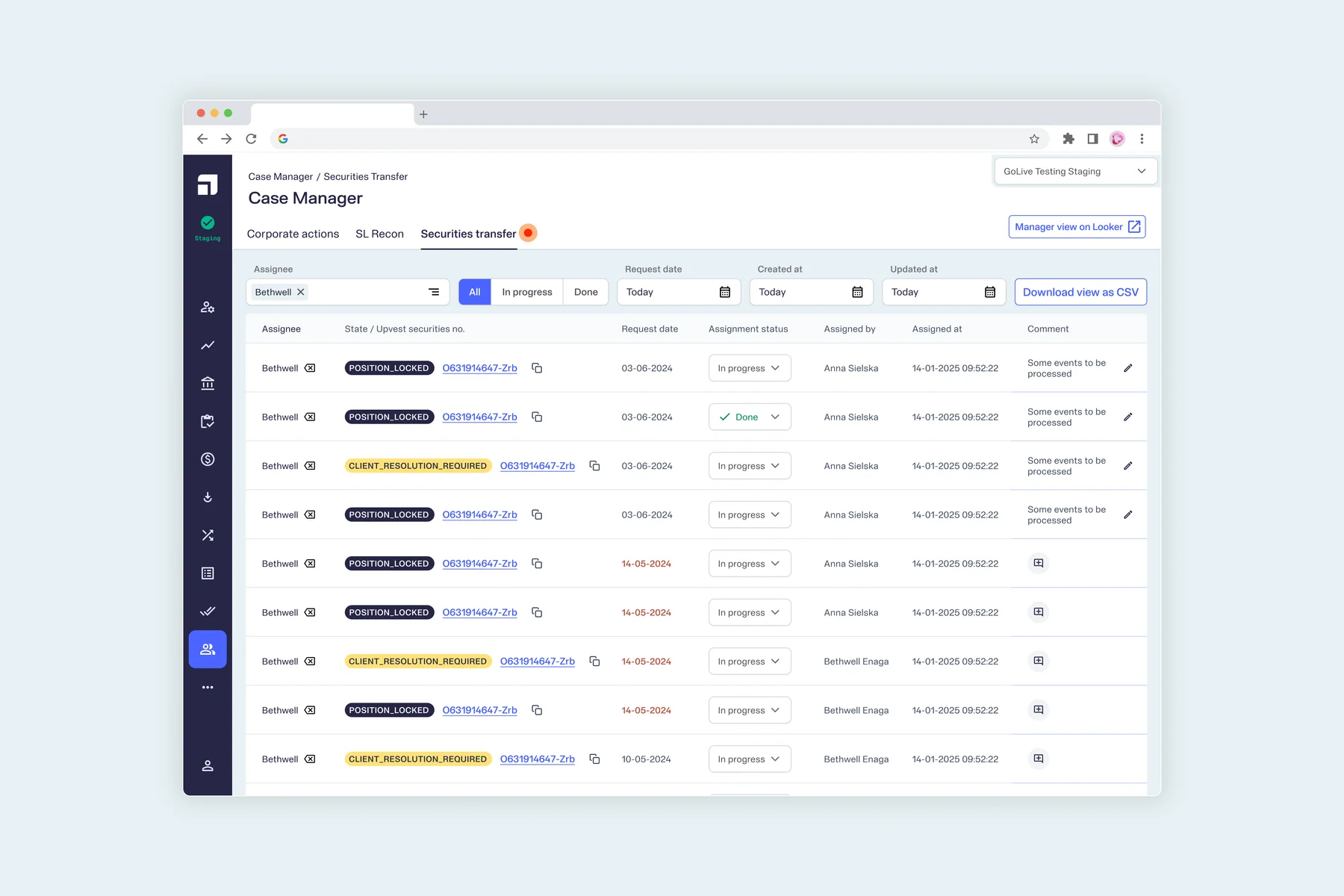
The Case Manager is no longer one overwhelming page, but separated into categories of domains. The sub-menu shows the names of the modules that already have either the assignment or the comment functions.

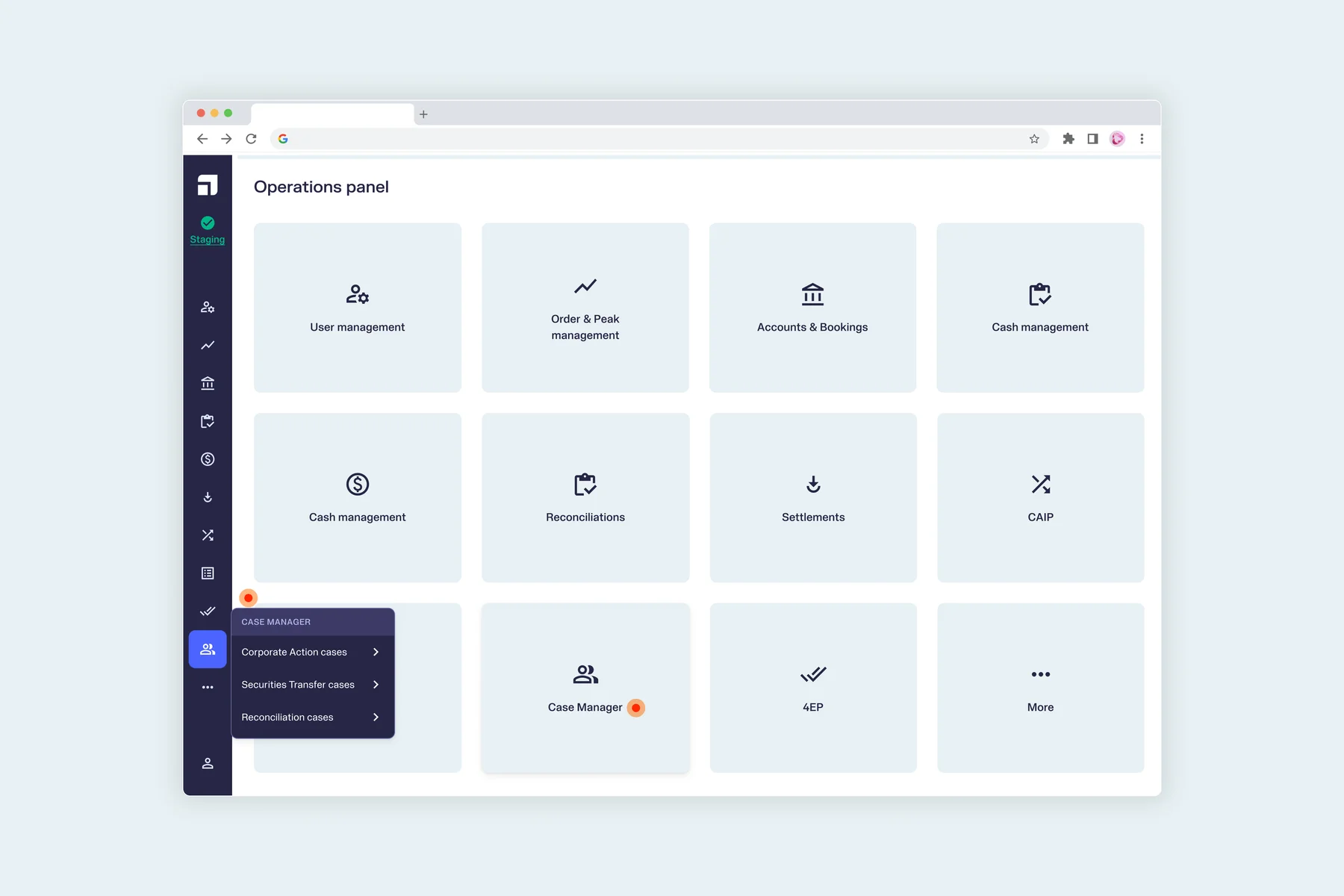

An example of a fully fleshed out page for Security Transfers' Assignments:

Adding Access Levels
Adding access levels to the Case Manager can introduce another level of ease for the Ops personnel because if an agent has access to only one domain (Eg. CA), they don't have to view the other domains and can arrive at their tab on one click.
All the tabs are shown below, however, exactly as they will be implemented for those with the highest level of access. So in each tab, the filters, and by extension, the table's columns will reflect the need of the Ops agent working on the module/domain.
Insights / Outcome
The Case Manager project was worked on with the least amount of information and it's in times like this, that I realize:
- Less information is highly valuable for the freedom it provides. Specifically when the investigation leads to identifying gaps straight from those that use it, and results in a high when solving for it.
- For explorations like this, Figma is nothing with Miro. Collecting, workshopping and dumping raw details first; To later validate the direction, create the flow, add some structure, and later flesh it out, is but a meditative process.
- Design drafts are extremely valuable if discussed at the right time. If the direction is not validated, the user might just enjoy the visual improvement and push for it. And at this stage, the Case Manager drafts weren't discussed with Ops , exactly for this reason.
Next project
Admin backoffice


Internal operations management of order & financial processes
Back-Office DashboardWeb (Desktop)
Read more